

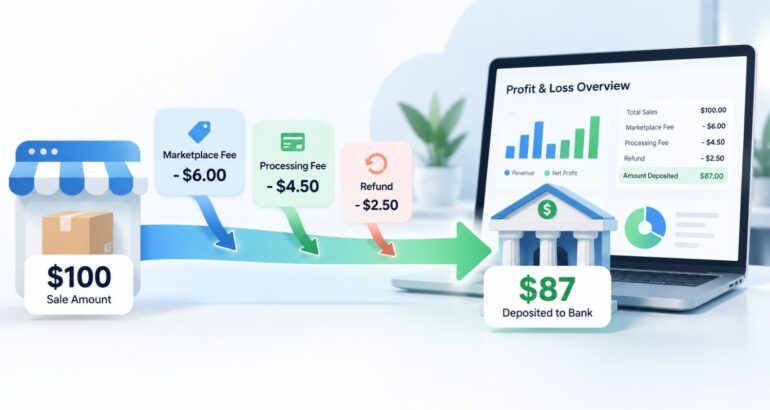
E-Commerce Bookkeeping: How to Track Online Sales, Fees, Inventory, and Profit: If you sell online, your bank account rarely matches your sales. A customer pays $100, but you receive $87 a few days later, after marketplace fees and payment processing. Then a refund comes through, a supplier invoice lands, and your ad platform charges your card. Add inventory sitting in a warehouse, and “how much did we actually make?” becomes a hard question.
That gap between what you sold and what you received is why e-commerce bookkeeping is different from bookkeeping for most other small businesses. This guide explains how to track online sales, fees, refunds, inventory, and real profit, and when e-commerce bookkeeping services may be worth considering. It’s general education, not tax, legal, or accounting advice.
Why E-Commerce Bookkeeping Is Different
A typical service business invoices a customer, gets paid, and records the deposit. An online seller deals with more moving parts:
- Multiple sales channels, such as your own store and one or more marketplaces
- Payment processors that deposit net amounts in batches, not order by order
- Fees deducted before you ever see the money
- Refunds, returns, and chargebacks that reverse earlier sales
- Inventory that you buy before you sell, so cash goes out first
- Shipping, packaging, and advertising costs that vary by order
Getting these right means your reports show true revenue, true costs, and true profit, not just cash movement.
How to Track Online Sales Correctly
The core rule: record gross sales, not just the deposit. If you record only the net payout, your revenue looks lower than it really was and your fees disappear into the bank balance.
For each channel:
- Record the full sale amount as revenue, by channel if you want to compare performance.
- Record fees separately as expenses (more on this below).
- Track sales tax collected separately. Collected tax is generally a liability you owe to a taxing authority, not revenue. Rules vary by state and by whether a marketplace collects on your behalf, so confirm with a tax professional.
- Match the payout to the orders it covers.
Most e-commerce platforms can export sales and payout reports. Using those reports, rather than manually keying orders, reduces errors and saves time. Whether you use a connected app or a periodic import, make sure the totals tie back to your platform reports.
How to Handle Marketplace and Payment Processor Fees
Fees are one of the easiest places for e-commerce books to go wrong, because they’re usually deducted before the payout arrives. Here’s a simple illustration:
| Item | Amount |
|---|---|
| Customer pays | $100.00 |
| Marketplace fee | −$10.00 |
| Payment processing fee | −$3.00 |
| Deposit to your bank | $87.00 |
This example is for illustration only; real fees vary by platform and plan.
If you record just the $87 deposit, your books understate both sales and expenses. Instead, record $100 as revenue and the $13 as fee expenses. Your reports will then show how much of every sale goes to platforms, which is critical for pricing and margin decisions.
Tips:
- Create separate expense accounts for marketplace fees, payment processing fees, and subscription costs.
- Review fee changes periodically. A small increase can matter across thousands of orders.
- Keep platform statements as supporting documentation.
Refunds, Returns, and Chargebacks
Refunds reduce revenue; they’re not ordinary expenses. Record them as contra-revenue or in a returns account, so your reports show net sales. A few related points:
- Returned inventory. If the item goes back into stock, adjust inventory. If it’s damaged or unsellable, record the loss.
- Fees on refunds. Some platforms keep or refund fees, and policies differ, so check each channel’s rules.
- Chargebacks. Disputed payments may reverse revenue and add fees. Record them when they occur and keep documentation for any dispute.
- Timing. A refund issued in a later month still belongs to the month it’s processed, so reconcile carefully around month-end.
Inventory and Cost of Goods Sold
If you buy products to resell, inventory is an asset until it sells. When it sells, its cost moves into cost of goods sold (COGS), which is what lets you see gross profit.
A common way to think about it:
Beginning inventory + purchases − ending inventory = cost of goods sold
To track this well:
- Record inventory purchases as inventory, not as expenses, when you buy them.
- Include relevant costs such as freight-in, depending on your method and your tax professional’s advice.
- Count or reconcile inventory regularly against your records.
- Decide on a consistent costing approach, such as first-in-first-out or average cost, with guidance from a tax professional.
If you use dropshipping or print-on-demand, you may not hold inventory, but you still have product costs per order that belong in COGS. How you account for them depends on your setup.
Shipping, Advertising, and Other Costs
Other costs can make or break profit:
- Shipping and packaging. Track what you pay carriers and what customers pay you for shipping separately, so you can see whether shipping is profit-neutral.
- Advertising. Record ad spend by platform, so you can compare cost to the sales each channel generates.
- Software and subscriptions. Store platforms, apps, and tools add up.
- Supplier and vendor bills. Keep these organized and paid on time; accounts payable and receivable support can help if bills are slipping.
Reconciling Sales, Payouts, and Bank Deposits
Reconciliation is where most e-commerce problems show up. A monthly process might look like this:
- Export sales, refunds, and fees from each platform for the month.
- Compare platform totals with what you recorded in your books.
- Match each payout to your bank deposit.
- Explain differences, such as timing, reserves, or held funds.
- Reconcile bank and credit card accounts.
- Review unusual items before closing the month.
Payouts often cross month boundaries, so a deposit in January may cover December orders. Track these timing differences instead of forcing numbers to match.
Measuring Real Profit
A healthy bank balance doesn’t mean a profitable store. To see real profit, review:
- Profit and loss statement: net sales, COGS, fees, shipping, advertising, and other expenses
- Balance sheet: inventory, cash, amounts owed to suppliers, and sales tax liabilities
- Cash flow report: how cash moves, which matters when you buy inventory ahead of sales
Look at gross margin (revenue minus COGS) and net margin after fees and ads, and compare them by channel or product if your data allows. If you want help turning those reports into plans, XS4FM’s budgeting and forecasting services and virtual CFO services cover forecasting, margin analysis, and cash flow planning.
A Monthly E-Commerce Bookkeeping Checklist
- ☐ Export sales, refund, and fee reports from every channel
- ☐ Record gross sales, fees, and refunds correctly
- ☐ Match payouts to bank deposits
- ☐ Reconcile bank and credit card accounts
- ☐ Update inventory and COGS
- ☐ Review sales tax collected and owed
- ☐ Review supplier bills and unpaid invoices
- ☐ Review ad spend and shipping costs
- ☐ Review the profit and loss statement, balance sheet, and cash flow report
- ☐ File supporting documents and close the month
For the general version of this routine, see our monthly bookkeeping checklist.
Common E-Commerce Bookkeeping Mistakes
- Recording only net payouts, which hides fees and understates sales
- Treating collected sales tax as revenue
- Expensing inventory when it’s purchased instead of when it sells
- Ignoring refunds and chargebacks, which overstates revenue
- Mixing personal and business transactions in a shared payment account
- Skipping payout reconciliation until tax time
- Judging success by revenue instead of margin
When to Consider E-Commerce Bookkeeping Services
Many sellers handle their books alone at first. Consider outside help when:
- Order volume is growing faster than your records
- You sell on multiple platforms and the reconciliations are piling up
- You’re unsure whether the business is profitable after fees, shipping, and ads
- Inventory and COGS are hard to track
- Your books are behind or contain errors
- You want reliable monthly reports without doing the work yourself
When comparing providers, ask:
- Which platforms and payment processors do they work with, and how do they bring in sales data?
- How do they handle fees, refunds, and inventory?
- How do they coordinate with your tax professional on sales tax?
- What reports will you receive, and how often?
- How is your data protected?
How XS4FM can help
According to its bookkeeping services page, XS4FM works with small businesses and e-commerce companies, among others, and provides transaction recording and categorization, bank and credit card reconciliations, accounts payable and receivable tracking, expense tracking, payroll reconciliation support, and financial reporting. Reporting frequency can be customized. If your books are behind, its catch-up bookkeeping services are designed to bring overdue records up to date.
If you sell through specific platforms, ask XS4FM directly which integrations and workflows it supports before you commit.
Frequently Asked Questions
What is e-commerce bookkeeping?
E-commerce bookkeeping is the recording and organizing of an online seller’s financial data: sales, fees, refunds, inventory, shipping, advertising, and payouts. It differs from general bookkeeping because platforms deposit net amounts, which makes reconciliation and accurate profit tracking more complex.
How do I record marketplace and payment processing fees?
Record the full sale as revenue and the fees as separate expenses, rather than recording only the net deposit. This keeps revenue accurate and shows how much each platform costs you. Use separate accounts for marketplace fees and payment processing fees.
How do I track inventory and cost of goods sold?
Record purchases as inventory, then move the cost to cost of goods sold when items sell. Reconcile inventory counts regularly. The costing method you choose can affect your reports and taxes, so confirm it with a tax professional.
Is sales tax revenue?
Generally, no. Sales tax you collect is typically a liability owed to the taxing authority. Rules vary by state, and some marketplaces collect on your behalf, so confirm what applies to you with a qualified tax professional.
How often should an online seller reconcile?
Monthly at a minimum, including payout and bank reconciliations. Higher-volume sellers may reconcile weekly. Regular reconciliation catches missing orders, duplicate entries, and fee discrepancies while they’re easy to trace.
When should an online seller hire a bookkeeper?
Consider it when volume grows, multiple channels complicate reconciliation, profit is unclear, inventory is hard to track, or your books are behind. The right timing depends on your complexity, budget, and how much time you can spare.
Ready to Get Clear on Your Online Store’s Numbers?
Good e-commerce bookkeeping answers the questions that matter: what you really sold, what you really kept, and where the margin goes. Start with gross sales, fees, refunds, and inventory, and reconcile monthly.
If you’d like support, explore XS4FM’s bookkeeping services for online businesses, contact the team to discuss your needs, or learn more about XS4FM and its financial management services.
